The studio
One window, from the first sentence to the rollout.
An agent that works in your project’s own folder, with the surfaces a product needs built around it: a design canvas, an app runner, a memory, a git repository, a release ladder, a code editor, and a door for every other tool you use. Design comes first, always. Code runs only when you say so.
Design
The chat and the canvas.
Create a project from the dotted + tile and type your first sentence. That message is the kickoff: it names the project and starts the design. The agent asks the few things it needs on one card, then writes each screen onto the canvas, element by element, while you watch.
Questions on a card
When the agent needs a decision it asks through a card: option chips, multi select where it fits, a free text field, and explainers for the choices. A question marked secret masks its field; the value goes to the workspace’s .env.local and the agent only learns that it was stored.
A canvas, not a slideshow
Scroll or drag to pan, Space for the hand, ⌘ and plus or minus to zoom, 0 to fit everything. V, H, F, T and R pick the tools. Click any element for its layers and properties. The screens bar along the bottom lists every screen and tags the ones a draft added.
Design first, full stop
A request for a new feature, flow or screen, on a new project or an app that already exists, is a design request: the agent draws the new or changed screens and stops. Code runs only on “build it” or Start. The design system view shows the tokens; Preview shows the design as a page.
Build
Two stages, on purpose.
Ask to build it. The agent asks one technical card, recommends a stack and lays out a three phase plan; in this stage it cannot write a file. The plan ends with “Press Start the build below when you are ready.” Only Start lets it write.
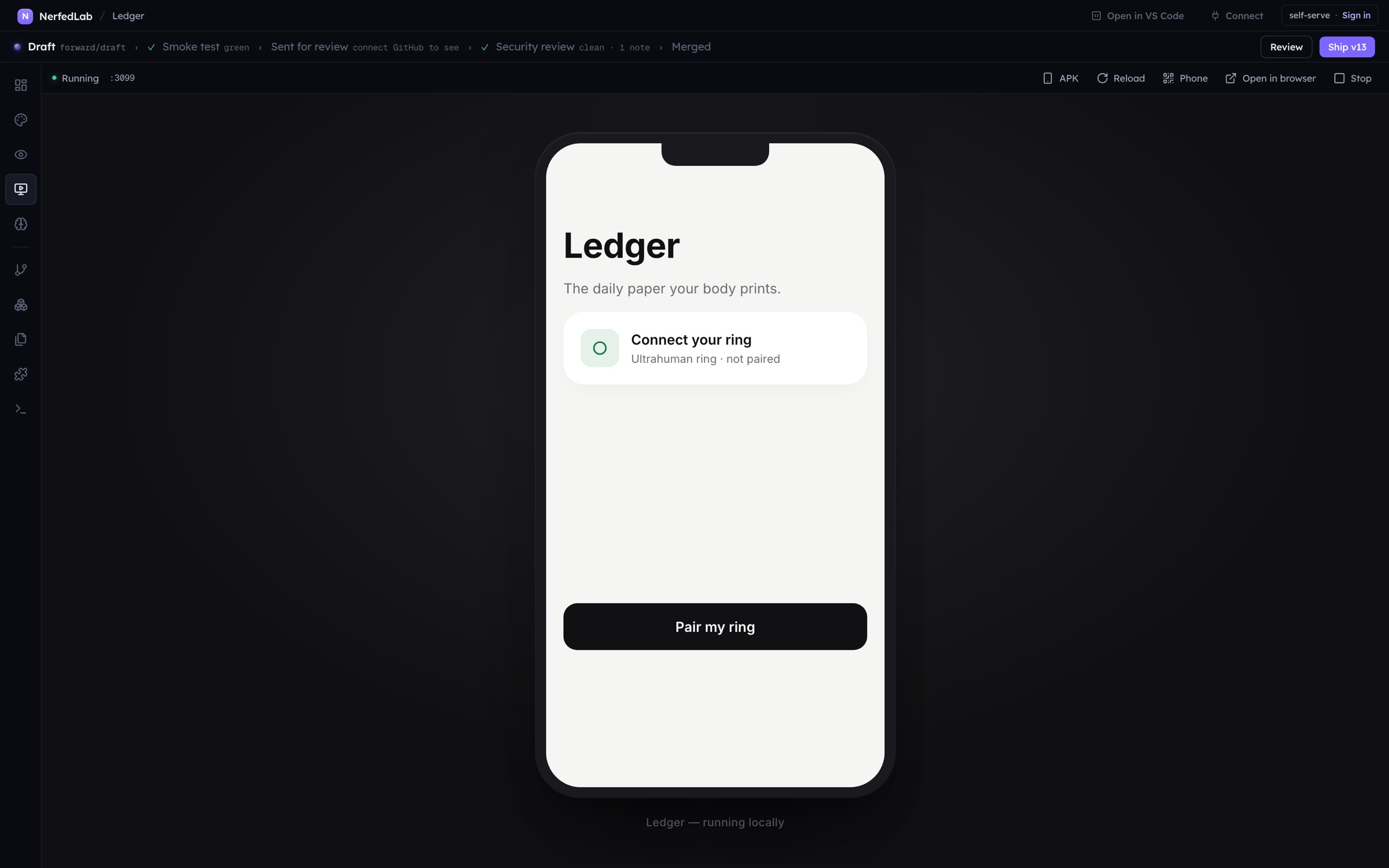
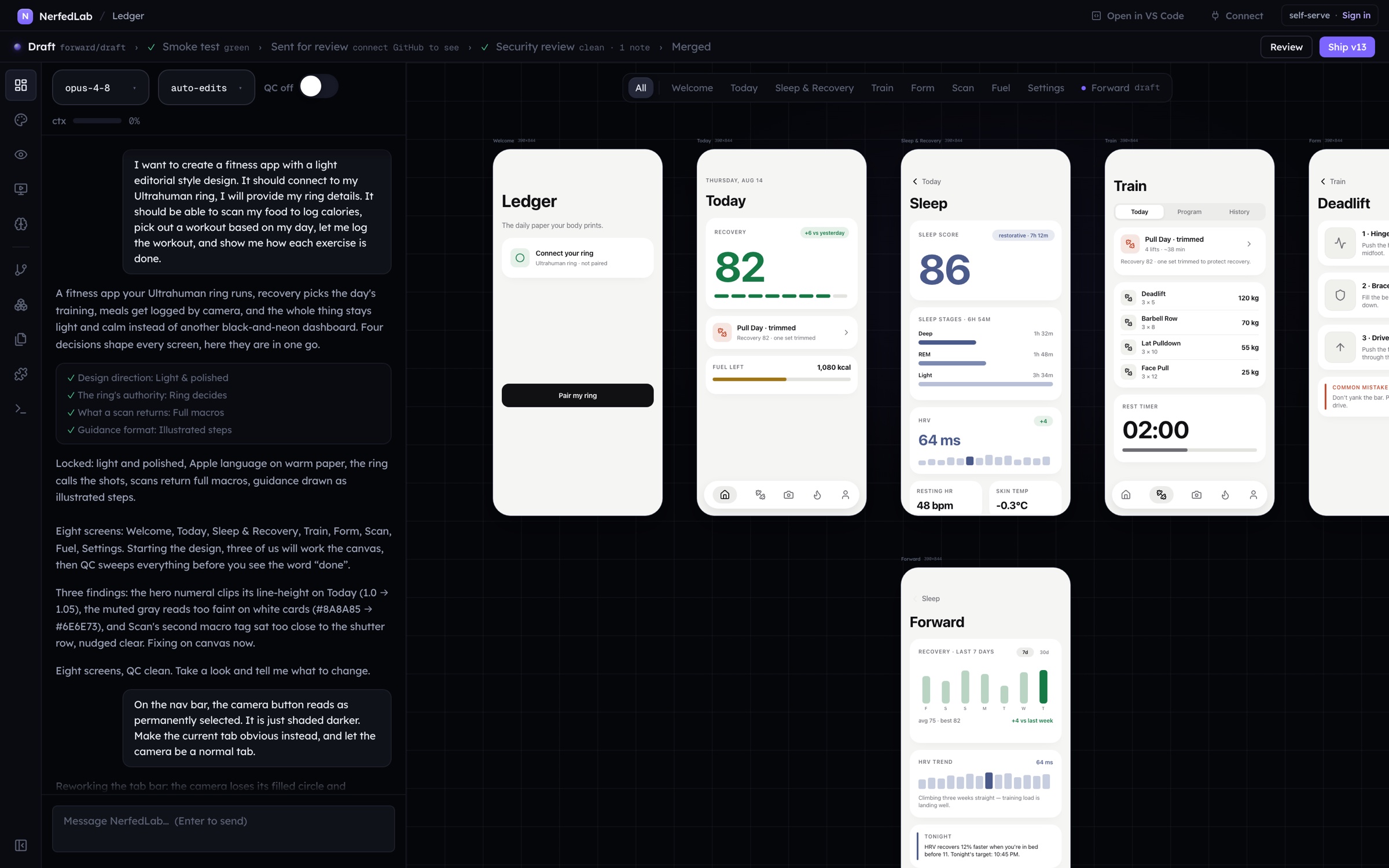
The built app is the canvas
Start lifts the design one to one into an app shell (a section per screen, the design’s fonts, navigation between screens), commits it, and then the agent adds behavior. It never redraws or restyles a screen. On an app that already has the shell, Start lifts only the screens whose design changed.
The build plays in the chat
Teammates fan out and show up as chips with names. Phases are reported as one chip that updates in place, never a wall. Thinking is one live line. The first successful build stacks the app into a phone in front of you.
The App view
One live instance of the app: Build this design into an app, Install deps and build, Building with the live feed, Running with Reload, Open in browser and Stop, or The app didn’t start with the error and a Fix this that hands it to the agent. Preview on phone serves it on your network with a QR code; until then it is reachable only from this Mac. The phone icon packages an Android APK.
Memory
A product remembers itself.
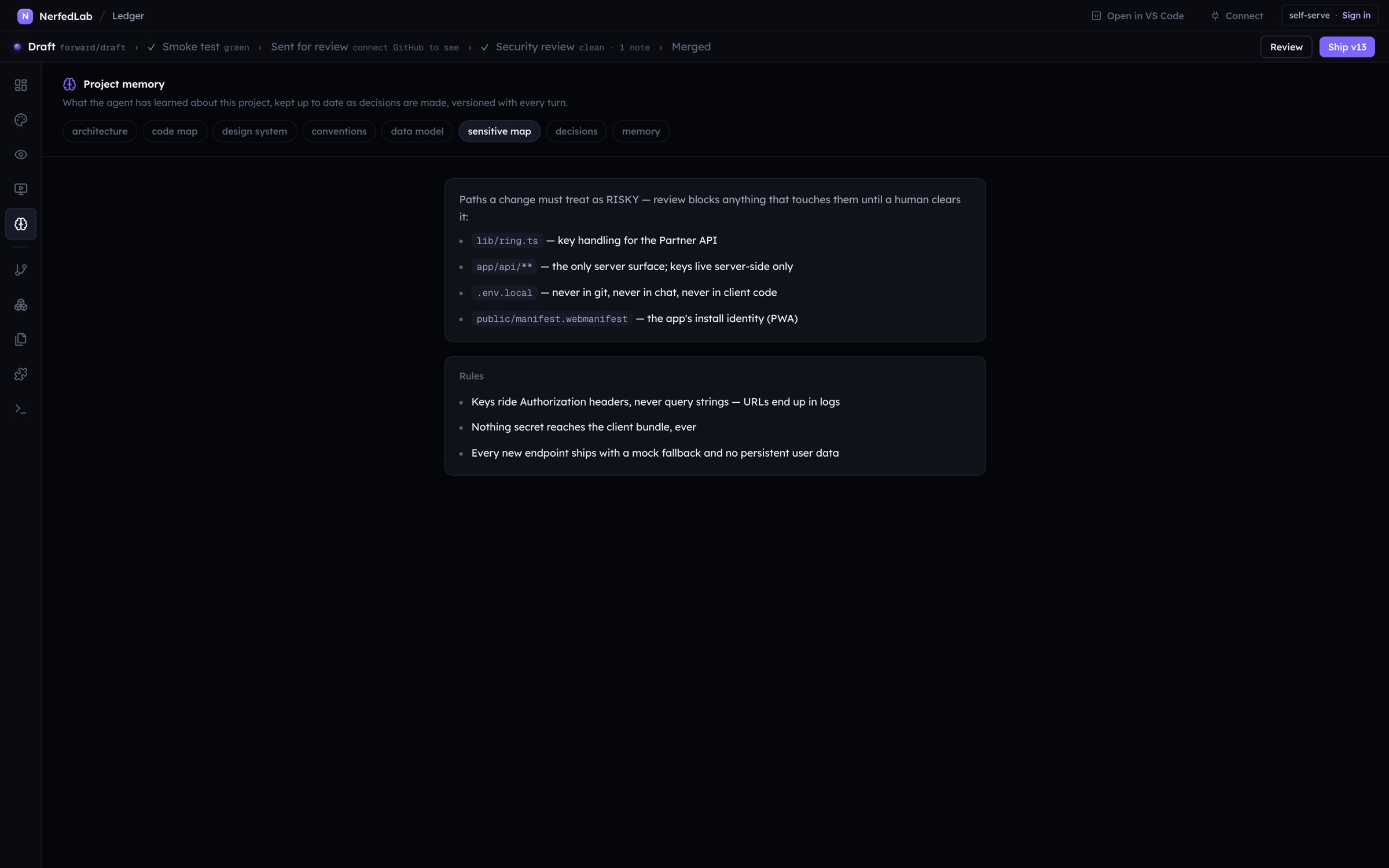
Seven short documents under memory/: architecture, code map, design system, conventions, data model, the sensitive map and decisions. On a repository that came from NerfedLab the sync runs on its own when the Branches home opens; on any other repository a button offers it. The agent writes what it decides as it decides it; the product records what it knows for certain, like the version each Ship shipped.

Ship
Drafts, the smoke test, the review, the version, the rollout.
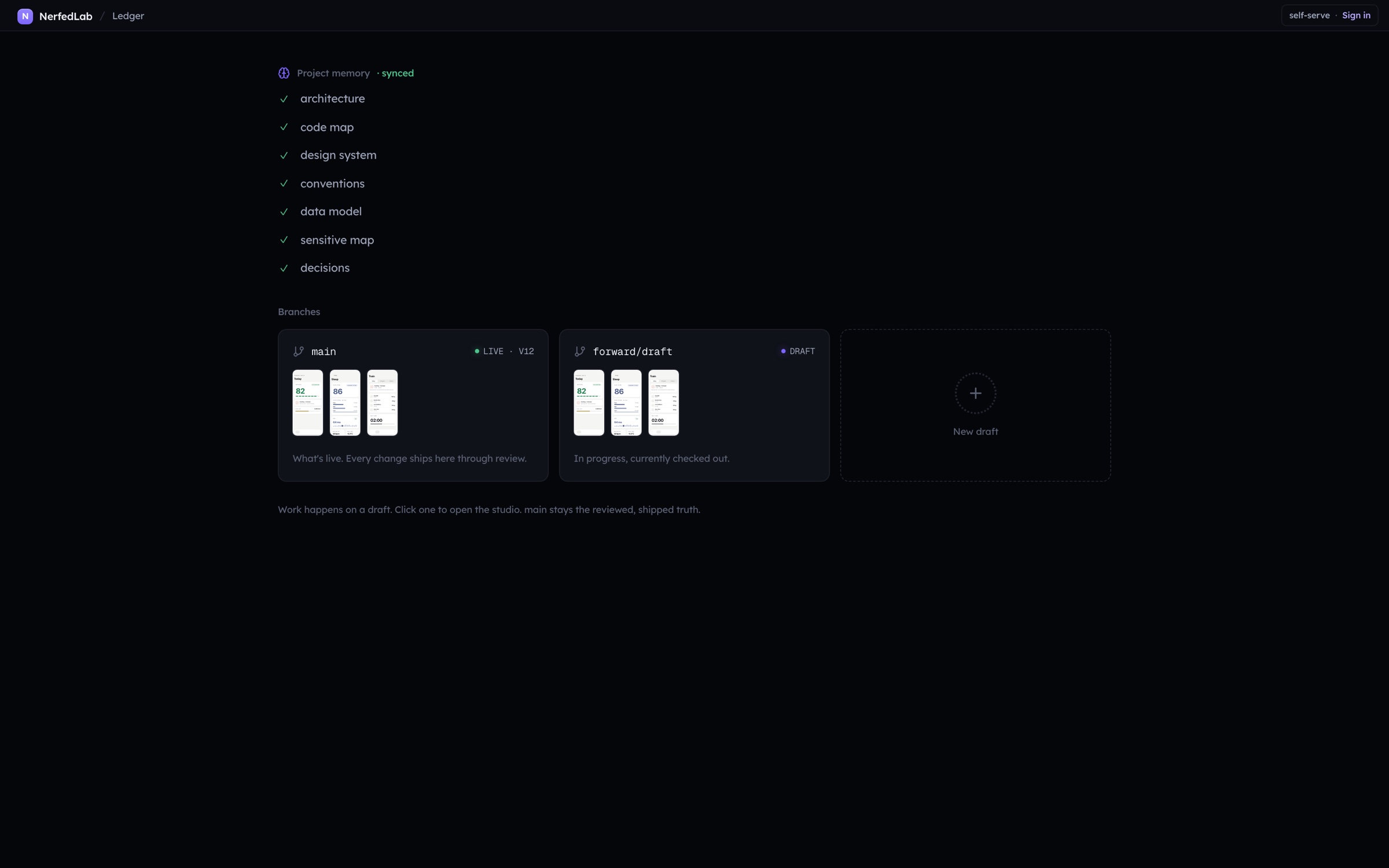
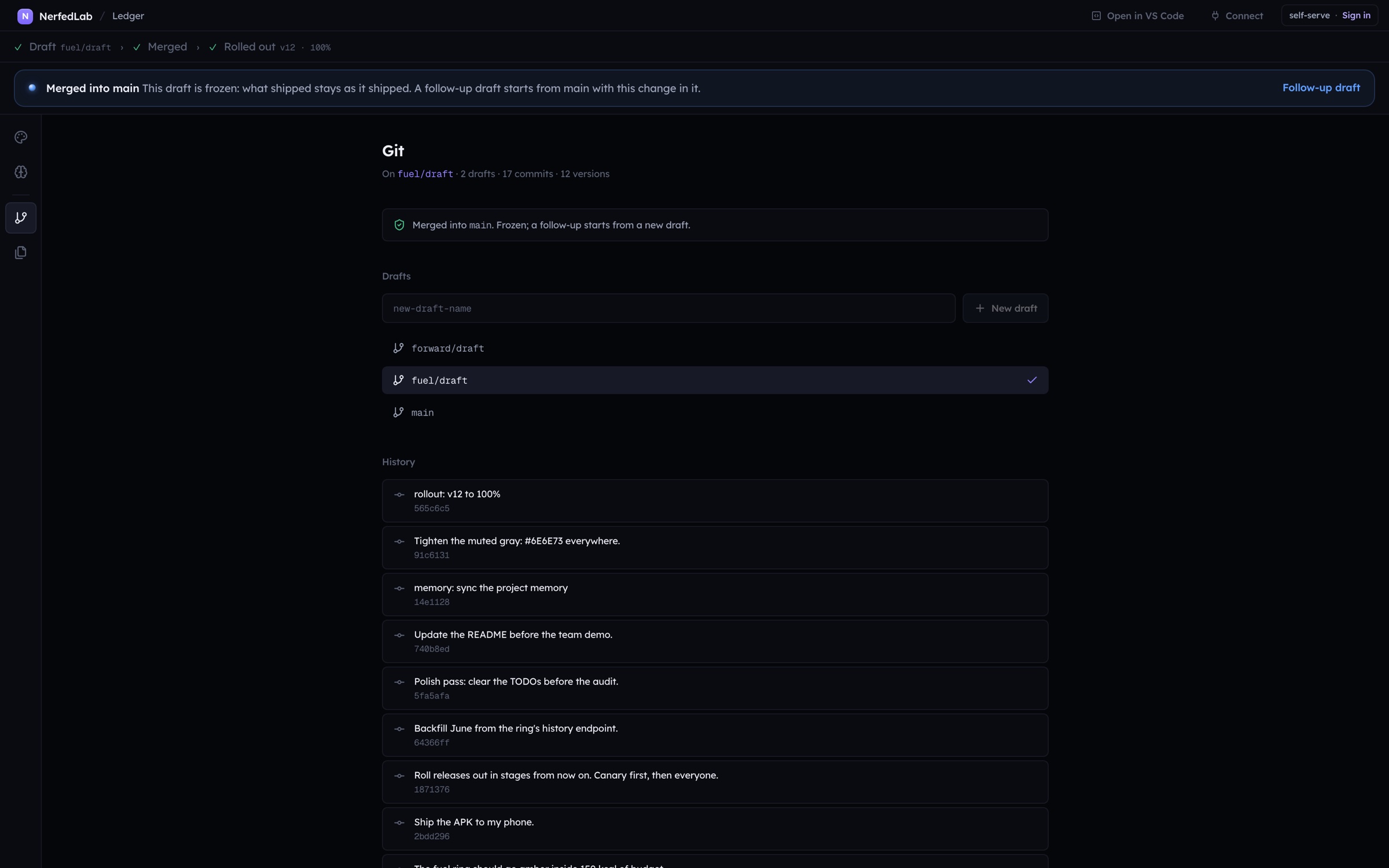
Connect GitHub through the device flow (a code, github.com, Authorize; nothing to paste) and publish. A project with a repository is a product: it opens on its Branches home, main is what is live and is read, never worked on, and work happens on drafts, each a session of its own.
The ladder reads the truth
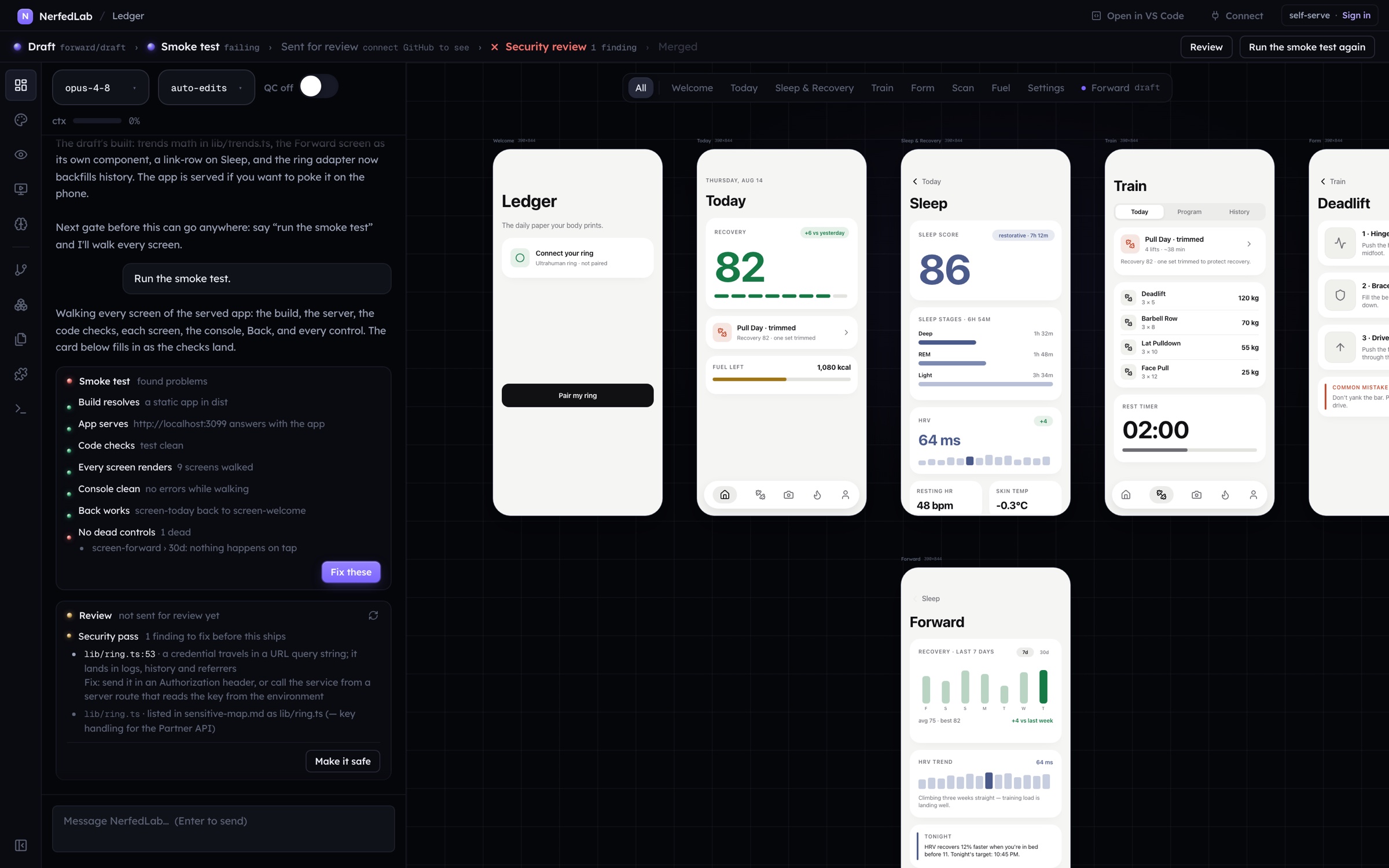
The strip under the titlebar derives every step from real state: the branch, whether main contains the tip, the version tags, the open pull request, the rollout file. A step with no source is absent, never narrated. The verbs that can run right now sit on it: Run the smoke test, Send for approval, Ship vN, Review.
The smoke test
Seven checks over the draft’s served app in a headless browser: the build, the server, the code checks, every screen present, a clean console, Back working, and no dead controls (a painted control that does nothing is named). The verdict is about a commit: a new commit makes it stale. A green verdict about the tip is mandatory before approval.
The pull request is the review
Send for approval pushes the draft, opens the pull request, asks your reviewers (never the author), and posts the automated security pass over the diff: a credential in a URL, a secret behind a public build variable, a hardcoded credential, the paths your sensitive map calls risky. The Review card in the chat mirrors reviews and comments, replies as you, and hands findings to the agent with Make it safe or Address the review.
Ship vN
Once the smoke test is green, the pass is clean and no change request is open, Ship fast forwards main, tags the version, pushes, records the version in memory, and arms a release at zero percent. An approval is about a diff: a commit after it resets it.
Rolling out
Every built app ships the rollout runtime. The slider (0, 10, 25, 50, 100) writes and commits the rollout file; the running app polls it and flips its own cohort membership live, no reload. A cohort grid shows ten real devices through the app’s own hash; Target this device is the override. Three cohort errors against a quiet baseline halt a live ramp on their own.
Go live, back up, import
Go live puts the static build on GitHub Pages with a public URL. Back up to GitHub is a full restore point (every draft, every version, the design, the chat history) in a private repository of your own. Import it on another Mac and the project comes back whole; import any other repository and the agent builds its memory first.
Security
Governed, so it can be fast.
Every gate is derived from real state and enforced in the routes, so the studio, a typed turn and a connected client all meet the same rules. Nothing here is narrated; a step with no source is absent.
The security pass
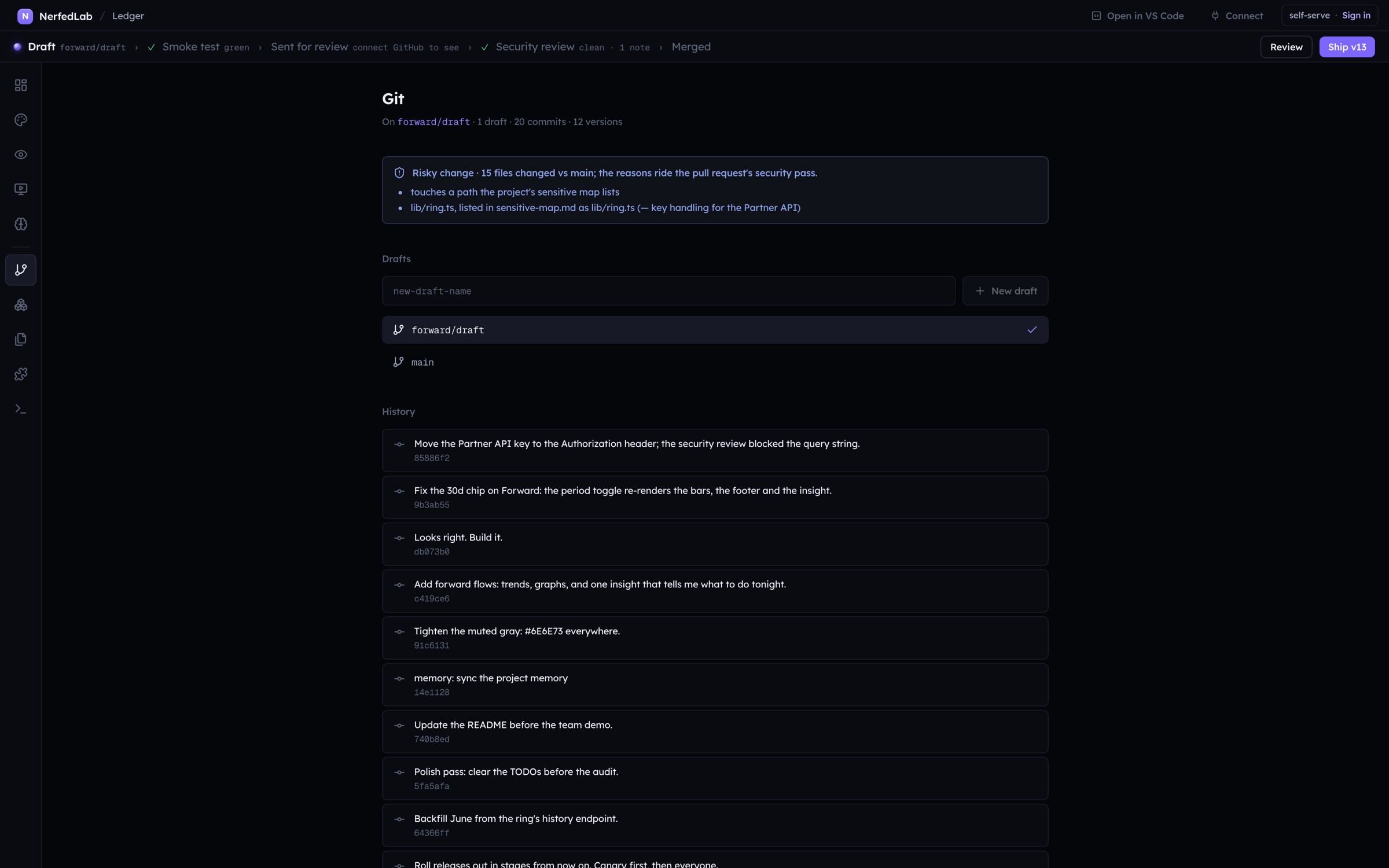
Runs over the draft’s diff against main when the pull request opens, and again on every change. It blocks on a credential in a URL query string, a secret behind a public build variable (NEXT_PUBLIC, VITE, EXPO_PUBLIC), a hardcoded credential (live keys, personal tokens, cloud keys, private key blocks) and the paths your sensitive map lists. A lookup key in a URL, a public browser key or a design token named “token” are notes, never blocks: a block must be nearly certain.
The risk badge and the sensitive map
Every draft carries a badge naming what its diff touches: auth, payments, the schema, infrastructure, dependencies, another module’s folder, and anything memory/sensitive-map.md lists with the map’s own reason. The map is yours: written by the agent when it reads the repository, edited by you.
Secrets
A question marked secret renders as a masked card. The value is written to the workspace’s .env.local (owner read and write only, ignored by git) and the model receives [stored as NAME in .env.local, not shown]. Secrets never enter the transcript, a commit subject or a connected client’s view. The Files view never lists them.
The gates, in the routes
- No pull request without a green smoke verdict about the tip (412)
- No Ship with a failing or stale smoke test, a blocking finding or an open change request (412)
- An approval is about a diff: a commit after it resets it
- The author is never asked to review; reviewers are GitHub logins you name, plus the install’s default
- Main is read, never worked on; a merged draft is frozen
Keys, tokens, the network
- GitHub connects by device flow; the token stays encrypted in the macOS keychain, off our servers
- The MCP token: one per install, a bearer header, never a URL; rotate it from Connect
- Connect answers only on the machine NerfedLab runs on
- The served app and the VS Code server bind to this machine until you opt in to Preview on phone
- Permission modes per session: auto edits, bypass all, or plan (read only)
Guardrails after shipping
- A version arms at zero percent; a ramp is a config commit
- Sticky buckets per device; Target this device is the override
- Three cohort errors against a quiet baseline halt a live ramp on their own
- Restore is a forward commit, never a rewrite; the mirror to GitHub is one way
- Crash reports scrub paths and usernames and carry none of your work
Two modes, decided on the server. The entitlement your account carries is set by an explicit flag or by your company’s email domain, never by the app. In self-serve you hold the technical gate. In enterprise, by arrangement, NerfedLab’s engineers review and merge. Write to hello@nerfedlab.com.
Code
Files, Git, Modules, VS Code, Terminal.
The workspace is a normal git repository and the studio treats it like one. Every agent turn commits with your words as the message; Restore makes any commit the new tip as a forward commit, never a rewrite.
Files
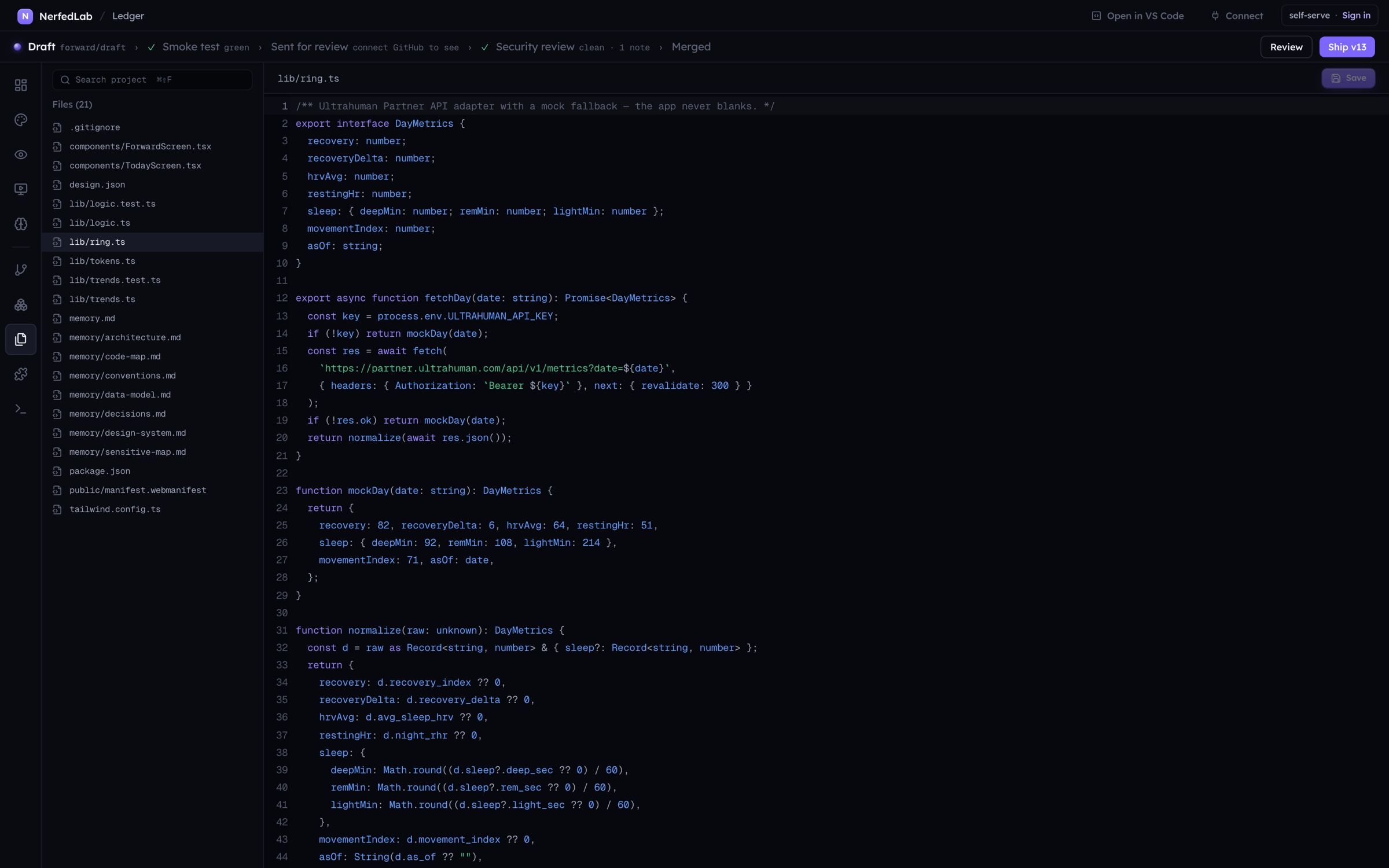
A real editor over the workspace. ⌘S saves, ⌘⇧F searches the project with Replace all. TypeScript checks as you type; hover for types, ⌘ click to a definition, F2 to rename across the project. Select code and press ⌘K to ask the agent for an inline edit; the result comes back as a diff to accept or reject. Works offline.
VS Code, inside
The editor itself, extensions included, on the project’s workspace: VSCodium’s server installed on demand (about 125 MB, MIT), extensions from Open VSX, one server for the whole of NerfedLab on this machine only. Open in VS Code hands the workspace to your own editor instead.
Git, Modules, Terminal
Drafts to cut and switch, the history, Ship as vN on main, a risk badge naming what a draft touches (auth, payments, schema, infrastructure, dependencies), the GitHub section. Modules is the workspace’s module map. Terminal is a shell rooted in the workspace.
Connect
NerfedLab is an MCP server.
Every verb the studio has, a connected client has: create a project, talk to its session, read the design, run the two stage build, serve the app, run the smoke test, open the pull request, ship, ramp. By the same rules: design first, the plan before Start, the smoke test before approval, the review before Ship.
The clients
- Claude Code, with one command
- Claude Desktop, through a small stdio bridge that finds NerfedLab on its own
- VS Code: Add to VS Code, for Copilot agent mode, Cline, Continue and the Claude Code extension
- Cursor: Add to Cursor
- Codex and anything else that speaks MCP: the config block or the raw URL and header
The door
- Streamable HTTP, JSON-RPC, 126 tools in 11 groups
- One bearer token per install, minted on first use, rotated from the Connect dialog
- The token travels as a header, never in a URL; the Connect dialog answers only on the machine NerfedLab runs on
- A long tool (a model turn, a build, a smoke run) answers over a stream with keepalives
- GitHub verbs act as you only if you switch on “Let connected clients use my GitHub”
One implementation
A tool calls the same route handler the studio calls, in process. No verb has a second implementation, so a rule the studio enforces holds for an external client too. The Connect dialog lives on the home screen’s header and the studio titlebar.
claude mcp add --transport http nerfedlab http://localhost:3030/api/mcp --header "Authorization: Bearer <token>"Claude Codecode --add-mcp '{"name":"nerfedlab","type":"http","url":"http://localhost:3030/api/mcp","headers":{"Authorization":"Bearer <token>"}}'VS CodeUnder the hood
Your subscription, your machine, your data.
The engine
Every AI turn runs on your Mac on the subscription you already have; for a company, the subscriptions it chooses. There is no NerfedLab API key and no server side generation. The session inherits the model and effort you pick in the chat, and the permission mode: auto edits, bypass all, or plan.
The data
Projects live under ~/.nerfed; the workspace inside each is a normal git repository. The served app binds to this machine only until you choose Preview on phone. Your GitHub token stays in the macOS keychain and never reaches our servers.
The app
A notarized Mac app for Apple silicon that checks for an update at launch, downloads it in the background and installs it when you quit. Releases roll out in stages. Crash reports are on by default and carry none of your work; usage stats are off unless you opt in.